 SQL connector
|
<< Click to Display Table of Contents >> Navigation: Reference > Connector properties > |
|
|
|
Database properties
Select the database driver type and connection string to the database you want to use. Diafaan SMS Server supports three database driver types, Microsoft SQL Server (Express), ODBC and OLE DB.

Send SMS properties
In the Send SMS tab page you can enter the table name and the basic database field names of the database table that is polled for new messages to send. After the database records are read in, the records are either removed from the database or one of the database fields is set to a fixed value. Records where this value is set are not read anymore in successive database transactions.
If large numbers of messages will be sent it is better to remove the records from the database, leaving a large number of records in the database might have an impact on the database performance.
The 'Filter' option limits the records that are imported from the database table. The first parameter is the database field name that the filter applies to, then the database operator (= or LIKE) and the filter value.
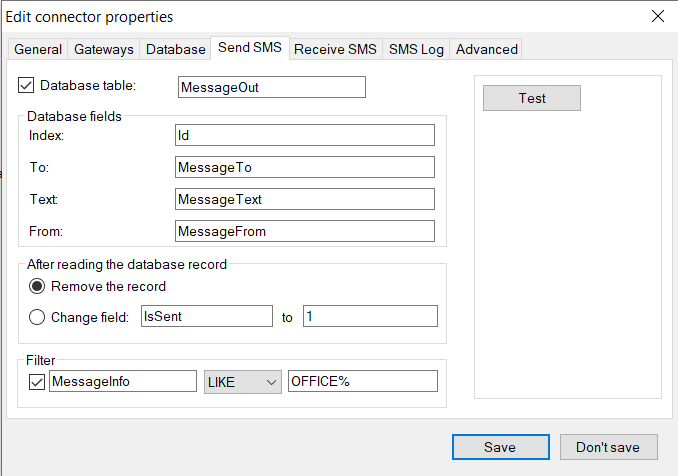
In the Send SMS tab page you can also use double quotes to indicate fixed values. In the example below the To part of the SMS message is not retrieved from the database but all messages are sent to number +44xxxxxxxxxx. This enables you to use database tables where no GSM number is available. The only required database field is the Index, all other fields are optional.

The Advanced settings offers support for an SMSOutScheduled date/time database field. If this database field is used individual messages are not read from the database before the specified date and time.
Receive SMS properties
Use the values in the Receive SMS tab page to specify the database table name and basic database field names where received messages are stored. More fields from the received message can be specified in the Advanced properties.
SMS Log properties
The SMS Log database table is used to store the result of message send attempts. Specify the database table name and basic database field names where the message logs are stored. More fields can be specified in the Advanced properties.
The Message Status Code field stores the message result. Status codes between 200 and 299 indicate that the message is sent successfully. Status codes between 300 and 399 means that the message failed.
status codes
200 |
Message sent and accepted by the gateway. |
201 |
Message received on the GSM phone. |
300 |
Message failed or rejected by the gateway. |
301 |
Status error received after the message was accepted by the gateway |
The message status can be updated, this means that a message with status code 200 (accepted by the gateway) can change to status code 301 if the GSM network cannot deliver the message or to status code 201 when the message is delivered on the phone.
Advanced properties
LogCommunicationToFile
Log all SQL transactions from this gateway to a file.
MaximumBatchSize
The maximum number of database records this connector will process in one batch. If this value is higher than one and a number of messages are sent at the same time, the connector loads multiple messages concurrently. This increases the speed in which the messages are processed considerably.
SendPriority
Default message send priority, set to 0 to allow a custom priority for individual messages. A higher number ensures that messages are placed higher in the message send queue and are sent before messages with a lower priority.
NumberTemplate
The number template can be used to translate the number from one format to another.
For more information see Use number templates.
NumberWhiteList
List of allowed destination numbers (to address) for outgoing SMS messages, messages to other numbers are blocked. When the list does not have any items, messages to all numbers are allowed.
For more information about the white list and black list format see: Use white lists and black lists.
EnableHTTPCallbacks
Enable or disable HTTP callbacks for this gateway. This option is only available when the HTTP callback option is enabled in the general options.
DatabaseCharacterset
Specifies the most extensive character set the database supports, the best character set for most modern databases is 'Unicode'. The UCS2 character set can solve a compatibility problem with some Unicode characters (like smileys) on some versions of the MySQL database. ASCII can be used for older databases that do not support Unicode at all. Characters in received messages that are not in the selected character set are converted to question marks (?).
DatabaseCheckInterval
The time interval in seconds between two queries of the Send SMS database table.
DatabaseUpdateInterval
Minimum interval time for updates of the MessageIn and MessageLog database tables. Increase this value to increase the number of messages that are written or updated to the database per transaction, this can reduce strain on the database in high-traffic systems.
HandleSchedulingInDatabase
Set to 'True' (default) to keep scheduled messages in the database until the schedule time. Set to 'False' to handle scheduled messages in the internal send queue of Diafaan SMS Server.
LockMessageOutTable
Lock the MessageOut table for reading when the polling transaction is in progress. This option can be set when multiple SQL Connectors or multiple installations of Diafaan SMS Server use the same MessageOut table to import messages. With some database configuration this setting prevents that messages are loaded multiple times by different SQL Connectors.
MessageInErrorHandling
Specify what to do when storing received messages to the database fails with a database error. Set to 'Retry' to keep retrying or to 'SaveToCsvFile' to store the failed records to a text file in the folder. The .csv text files are stored in folder '%PROGRAMDATA%\Diafaan\Diafaan Message Server\Logs\Connector communication\'.
MessageLogErrorHandling
Specify what to do when storing or updating log files to the database fails with a database error. Set to 'Retry' to keep retrying or to 'SaveToCsvFile' to store the failed records to a text file. The .csv text files are stored in folder '%PROGRAMDATA%\Diafaan\Diafaan Message Server\Logs\Connector communication\'.
SendQueuePauseThreshold
Pause loading new messages from the MessageOut table when the send queue exceeds this threshold. Set to 0 to disable the threshold.
SQLFlavor
The type of database that is used, changing this value causes small changes in the SQL query strings to optimize performance.
database types
AnsiSQL92 |
Standard ANSI SQL |
Microsoft |
Implements the TOP keyword |
Oracle |
Implements the ROWNUM keyword |
MySQL |
Implements the LIMIT keyword |
Database field names
Additional database field names can be entered to query or store more parts of the sent or received message fields.