 GSM Modem gateway
GSM Modem gateway
|
<< Click to Display Table of Contents >> Navigation: Reference > Gateway properties > |
|
|
|
|
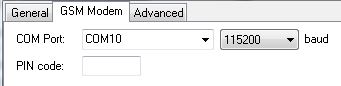
GSM Modem properties
COM Port
Select the name of the serial port where the GSM modem is connected. If the GSM modem is connected to a USB port you must select the name of the virtual COM port of the USB port driver.
Baudrate
Select the baudrate (speed) for the serial port. Often the baudrate is detected automatically by the GSM modem but some GSM modems require a fixed baudrate.
TCP/IP connected modems
The GSM Modem Gateway can directly use GSM modems connected over an Internet TCP/IP connection, without the need for additional drivers. To use a TCP/IP connected GSM modem select TCP/IP from the COM port list and enter the host name or IP number and the attached port number. The GSM Modem Gateway can use a raw TCP/IP connection or a Telnet connection to the modem.
PIN code
Type the PIN code of the SIM card. Using a PIN code on your SIM card is not recommended. If your SIM card does not have a PIN code you can leave this field empty.
Advanced properties
LogCommunicationToFile
Log all modem communication to file. Use this option only if you encounter problems with the GSM modem. If enabled, the status windows of the GSM modem provides a link to the location on you hard disk where the file is stored.
MaximumBatchSize
The maximum number message this gateway will process in one batch. If this value is higher than one and a number of messages are sent at the same time, the gateway loads multiple messages concurrently. This can increase the speed in which the messages are processed but it also might prevent normal load balancing for multiple GSM modems. The default value of MaximumBatchSize is Automatic, this sets the batch size to to an optimal value of 1 to 10, depending on the other settings in the GSM Modem Gateway.
NumberTemplate
The number template used to translate the 'To' number format for outbound message.
For more information see Use number templates.
NumberTemplateReceive
The number template used to translate the 'From' number format for inbound message.
For more information see Use number templates.
NumberWhiteList
List of allowed mobile numbers for received SMS messages, messages from other numbers are blocked. When the list does not have any items, received SMS messages from all numbers are allowed.
For more information about the white list and black list format see: Use white lists and black lists.
QuietHours
A list of 24 hour numbers (separated with semicolons) when sending messages with this gateway is paused. The hour number can be appended with .1, .2, .3 or .4 to specify the first, second, third or fourth quarter of the hour. If the messages cannot be sent with another gateway, they stay in the send queue until the quiet hours are over and this gateway resumes message sending.
00;01;23 pauses message sending from 23:00:00 to 01:59:59.
12.1;12.2;18.1;18.2 pauses message sending from 12:00:00 to 12:29:59 and from 18:00:00 to 18:29:59.
DisableOnFailedMessages
The number of consecutive failed messages after which the gateway will be disabled, set to 0 to disable this option.
DisableOnModemErrors
Set an error number and error number count after which the gateway will be disabled. This option can be used when a specific modem error is an indication of a permanent error. Use format e:c where e is the error number and c the number of errors that causes the gateway to be disabled, leave empty to disable this option.
EnableHTTPCallbacks
Enable or disable HTTP callbacks for this gateway. This option is only available when the HTTP callback option is enabled in the general options.
CompatibilityMode
Besides Normal Mode, two other compatibility mode options are available when you encounter problems with the operation of your GSM modem, Basic PDU Mode and Basic Text Mode.
Basic PDU Mode is a minimal implementation of the GSM 07.05 PDU standard. Only the necessary modem commands are used and options like delivery confirmation or signal quality are not supported. In this mode you will have to set the value for the SMSC number manually since the software will not query the GSM modem for the right SMSC number.
Basic Text Mode is a minimal implementation of the GSM 07.05 text mode standard. Support for unicode characters or binary messages is not available. Use this mode only if your GSM modem does not support PDU mode, some CDMA modems for instance can send and receive SMS messages in text mode only.
ModemInitializationBeginning
Additional modem initialization. This modem command is sent to the GSM modem before the rest of the initialization. A possible use for this property is the modem command to select the GSM operator you want to use. E.g. if the network operator code is 26202 (Vodafone Germany) the modem command is:
AT+COPS=1,2,26202
ModemInitializationCommand
The modem initialization command command, the default value is ATE0.
ModemInitializationEnd
Additional modem initialization. This modem command is sent to the GSM modem after the rest of the initialization.
ModemLogon
Logon parameters for TCP/IP modems that require a clear text logon procedure before it can be used to send and receive SMS messages. The logon parameter consist of multiple pairs of a trigger and response text separated by semicolons, the trigger and response parameter is separated by a "@" character. The GSM modem gateway waits for the trigger and sends the response when the trigger is received. If all triggers are handled, the modem is expected to be available to send and receive SMS messages. An example ModemLogon for the PORTech MV-370 modem is:
username:@voip;password:@1234;module1@module1;got!!
This means:
Wait for "username:" and send "voip" to the modem.
Wait for "password:" and send "1234" to the modem.
Wait for "module1" and send "module1" to the modem.
Wait for "got!!", the modem is now available to send and receive SMS messages.
ModemRebootCommand
The modem reboot command, default value is the AT+CFUN=1,1 command for a full reboot. Not all modems support a full reboot of the modem.
ModemRebootTime
After a modem reboot command the GSM modem needs some time for the reboot to complete and to reconnect to the mobile network. The ModemRebootTime specifies the number of seconds before the GSM Modem Gateway sends the next command.
ModemResetCommand
The modem reset command, the default value is AT&F.
PermanentErrorList
A list of GSM modem error codes (separated by semicolons) that are regarded as permanent errors. No more send attempts will be made for the message.
PermitModemCommandMessages
Permit messages with message type "modem.command", the text of the message is executed as an AT command on the modem.
RebootAfterNetworkFailure
If the GSM modem gateway is active, every 10 minutes the gateway queries the signal strength and network status of the GSM modem. If RebootAfterNetworkFailure is enabled the gateway sends a hard reset to the GSM modem when no GSM network is detected (rssi 99) or when it is not logged on to the GSM network.
RebootAfterNetworkRoaming
Reboot GSM modem when the modem reports it is not logged on to the home network but is roaming on another network.
RebootAfterReceiveError
Send the reboot command to the GSM modem if an error is reported after a receive SMS or delete received SMS command. This is often an indication of a network or GSM modem problem and can sometimes be resolved by a modem reboot.
RebootAfterSendError
Send the reboot command to the GSM modem if an error is reported after a send SMS command. This is often an indication of a network or GSM modem problem and can sometimes be resolved by a modem reboot.
RebootAfterTimeout
Send the reboot command to the GSM modem if no valid response to a modem command was received after a certain timeout. If supported by the GSM modem it will restart the connection to the GSM network.
RebootBeforeInitialization
Send the reboot command to the GSM modem every time the modem is initialized. This setting is useful if the modem sometimes does not recover from an internal error state.
RebootDaily
Send the reboot command to the GSM modem once every day. Use this only if the GSM modem starts getting problems when it runs for long periods.
ReceivePollAfterMaximumSendBatch
The maximum number of SMS messages that are sent immediately after each other before the GSM modem is checked for new received messages.
ReceivePollIntervalTime
The time (in seconds) between each check for new received messages when the GSM modem is not sending a message.
ReportCallerId
Get the caller identification of normal (voice) phone calls to the modem and forward them as received SMS messages with message type gsm.cli.
ReportCallerIdHangup
Send a hangup command (ATH0) to the modem when an incoming phone call is detected.
ReportCallerIdHangupCommand
The modem hangup command, default is ATH0.
SendDelayTime
Time (in seconds) between sending two consecutive SMS messages. This option can be used to delay sending of the messages if the mobile network is not able to process the messages fast enough.
SendLimit
The maximum number of message parts the GSM Modem Gateway sends per whole hour, day, week or month. 100H means 100 message parts per hour, 300D 300 message parts per day, 1000W 1000 message parts per week and 1000M 1000 message parts per month. When the maximum number of messages is reached, the GSM Modem Gateway will pause message sending until the start of the next time period. The gateway is not considered down during this period.
By default all send attempts are subtracted from the send limit, also when the GSM modem returns an error. You can add a list of error codes to the SendLimitErrorCodeExceptionList property for errors that should not be counted in the send limit.
SendLimitErrorCodeExceptionList
A list of GSM modem error codes that will not affect the send limit (Include 'timeout' in the list for timeout errors. Include 'all' for all errors, including timeout errors). Multiple error codes can be separated with semicolons.
SendTimeout
Response timeout value (in seconds) after sending a message (PDU) to the GSM modem.
SMSOverGPRS
Some GSM operators support sending SMS messages over a GPRS connection. If enabled this will speed up the sending messages considerably. Most GSM operators do not support SMS over GPRS or have only limited support. Sending messages will fail if this option is enabled and the GSM operator does not support it.
DataBits
Serial port data bits. default is 8.
FlowControl
Serial port flow control, default is None.
Parity
Serial port parity. default is no parity.
StopBits
Serial port stop bits. default is 1.
GSMNumber
The mobile phone number of the SIM card (optional). This number is only used to identify which GSM modem received an SMS message. If this value is set, it overrides the GSM number found on the SIM card.
SMSCNumber
The SMS Central number is the address of the SMS Central of your GSM operator. This number must be in international format, e.g. +491722270333 for the German Vodafone SMSC and is necessary if you want to send SMS messages. If this value is set, it overrides the SMSC number found on the SIM card.
CombineMultiPartMessage
If enabled, partial messages received on the GSM modem are combined to the original message length. Since delivery of some message parts might be delayed this could mean that the delivery of the whole message will be delayed. If, after a certain timeout, not all message parts are received, the partial messages are delivered individually. If disabled the partial messages are delivered individually.
CombineMultipartMessages can also be set to Binary. In this mode the received messages are not decoded and combined but forwarded as message type sms.binary with the message field set to <DCS>,<PID>,<UDL>,<UDH>,<Data>. This may be useful if you intend to use Diafaan SMS Server to retransmit the messages unaltered to one or more alternative receivers.
ConvertTimeStampToLocalTime
Use the time zone offset in the SMS time stamp to convert the time stamp to local date and time. When it is disabled then the raw time stamp is used.
DefaultAddressType
The address type used for mobile numbers that do not start with a + (international), # (national) or * (unknown). Most mobile operators prefer numbers in the International number format address type.
DeliveryConfirmation
Require status updates for the SMS messages after it is sent to the SMSC. If you do not need to know if the SMS messages are delivered on the GSM phone or if the status updates causes errors sending the messages you can disable status updates.
MaxMessageParts
Messages to send that are longer than 160 characters or 70 characters for unicode messages can be split in multiple SMS messages that are recombined to one message on the handset of the receiver. The MaxMessagePart property limits the amount of partial messages that the gateway sends with a long message. If the message is longer than can be sent with the maximum message parts, the rest of the message is discarded.
MaxShortCodeLength
The maximum number length where the number is regarded as a short code, short codes are encoded as Network Specific numbers.
MessageType
The message type is the default value for the SMS message encoding, the default value may be replaced with the message type specified by the sending Connector.
The gateway uses four possible value for the default message type:
Automatic |
Standard Text encoding is the default, Unicode encoding will be used only if the message contains characters that are not in the default GSM SMS character set. |
StandardText |
The default 7-bit GSM SMS character set is used, all other characters are converted to question marks. |
Unicode |
All messages are sent in Unicode 16-bit encoding. |
Data |
All messages are sent in binary 8-bit encoding. |
The GSM Modem gateway supports the following custom message types:
sms.automatic |
Standard Text encoding is the default, Unicode encoding will be used only if the message contains characters that are not in the default GSM SMS character set. |
sms.text |
The default 7-bit GSM SMS character set is used, all other characters are converted to question marks. |
sms.unicode |
The message is sent in Unicode 16-bit encoding. |
sms.binary |
The message is sent in binary 8-bit encoding. |
sms.automatic.flash |
Flash SMS, standard Text encoding is the default, Unicode encoding will be used only if the message contains characters that are not in the default GSM SMS character set. |
sms.text.flash |
Flash SMS, the default 7-bit GSM SMS character set is used, all other characters are converted to question marks. |
sms.unicode.flash |
Flash SMS, all messages are sent in Unicode 16-bit encoding. |
gsm.ussd |
Send a USSD command to the GSM operator (e.g. *101#). The response is sent as a received SMS message. |
Use16BitConcatenationId
Use a 16 bit concatenation ID to send long concatenated SMS messages, the default concatenation ID for SMS is an 8-bit number.
ValidityPeriod
The validity period of sent messages, specified in number of days (1-30) or as hexadecimal value (0x00-0xFF).
The hexadecimal values translate to the following validity period:
0x00 - 0x8F |
(Value + 1) x 5 minutes (i.e. 5 minutes intervals up to 12 hours) |
0x90 - 0xA7 |
12 hours + ((Value -143) x 30 minutes) |
0xA8 - 0xC4 |
(Value - 166) x 1 day |
0xC5 - 0xFF |
(Value - 192) x 1 week |
*Value is the decimal value of the hexadecimal number